
Introduction
Buying a VPN in 2026 can be confusing because almost every VPN company uses the same words: private, secure, anonymous, fast, no logs, and military-grade encryption. The problem is that these words do not always mean the same thing from one VPN provider to another.
A VPN can be useful, but it is not magic. It can protect parts of your internet connection, hide your real IP address from websites, and reduce what your internet provider or public Wi-Fi operator can see. But it does not make you completely anonymous, it does not replace good passwords, and it does not protect you from every scam, virus, fake website, or tracking system online.
This guide explains what a VPN actually does, how it works at a basic networking level, what protection you get, what protection you do not get, and which features matter most before you pay for a VPN subscription.
This is not a review of one specific VPN service. It is a practical buying guide to help you understand what to look for before choosing any VPN app or software in 2026.
What Is a VPN?
A VPN, or Virtual Private Network, is a service that creates an encrypted connection between your device and a VPN server. Instead of your internet traffic going directly from your phone, laptop, or tablet to the website you visit, your traffic first travels through the VPN tunnel.
A simple way to understand it:
Without a VPN:
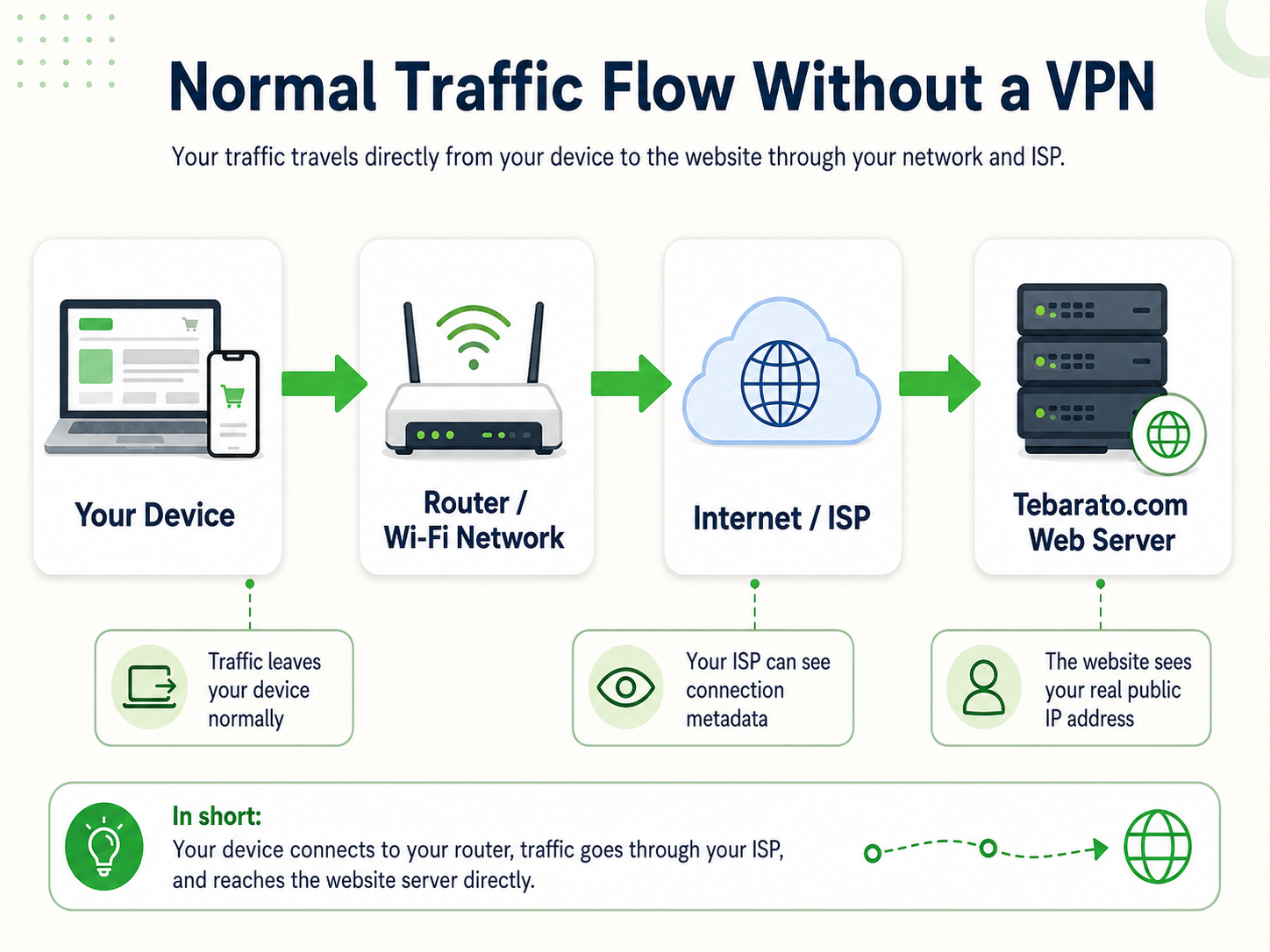
Your device → Internet provider or Wi-Fi network → Website or app
With a VPN:
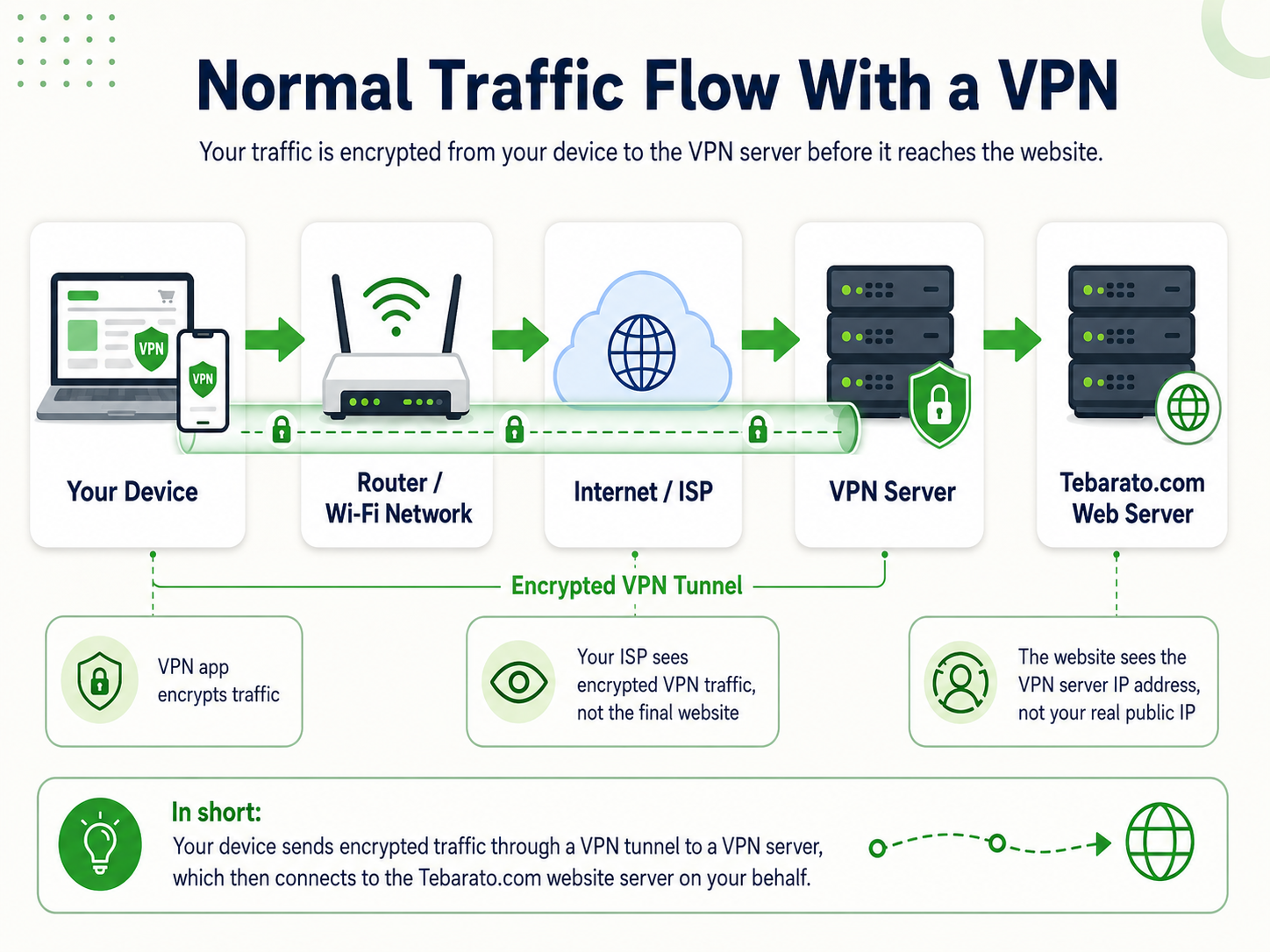
Your device → Encrypted VPN tunnel → VPN server → Website or app
To the website you visit, your traffic appears to come from the VPN server instead of your real home, mobile, or office internet connection.
How a VPN Works in Simple Terms
When you connect to a VPN app, the app does several things in the background:
- It authenticates your device with the VPN provider.
- It creates an encrypted tunnel between your device and the VPN server.
- It sends much of your internet traffic through that tunnel.
- The VPN server forwards your traffic to websites and apps.
- The websites send data back to the VPN server.
- The VPN server sends the response back to you through the encrypted tunnel.
This means that your internet service provider can usually see that you are connected to a VPN server, but it cannot easily see the exact websites or services you are visiting through that encrypted VPN tunnel. The website, on the other hand, usually sees the VPN server’s IP address instead of your real IP address.
The U.S. Federal Trade Commission warns that not all VPN apps protect users equally, and some may not encrypt all information properly, so it is important to research a VPN before trusting it.
How a VPN Works at the TCP/IP and Internet Protocol Level
To understand VPNs more deeply, we need to look at how the internet works.
When your device connects to a website, your data is broken into small pieces called packets. These packets travel across networks using internet protocols.
The most important parts are:
IP, or Internet Protocol, handles addressing. It decides where packets are coming from and where they are going.
TCP, or Transmission Control Protocol, helps create reliable connections. It checks that packets arrive correctly and in order.
UDP, or User Datagram Protocol, is faster and lighter than TCP but does not guarantee delivery in the same way. Many VPN protocols use UDP because it can be faster for tunnelling traffic.
DNS, or Domain Name System, translates website names like example.com into IP addresses.
When you use the internet without a VPN, your device sends packets using your normal IP address. Your internet provider routes those packets to the destination. Even when HTTPS protects the content of a website, some metadata may still be visible, such as the IP address you connect to and, depending on your DNS setup, the domain lookup.
When you use a VPN, the VPN app wraps your original packets inside another encrypted packet. This is called encapsulation or tunnelling.
A simplified version looks like this:
Original packet:
Your device IP → Website IP
VPN-protected packet:
Your device IP → VPN server IP
Inside the encrypted tunnel: your original request to the website
The outside network sees that your device is talking to the VPN server. The final website sees that the VPN server is talking to it. The VPN server sits in the middle and forwards the traffic.
That is why choosing a trustworthy VPN provider matters. You are not removing trust completely. You are moving some trust away from your internet provider or public Wi-Fi operator and placing it with the VPN company.
What Does a VPN Protect You From?
A good VPN can provide useful protection in several situations.
1. It protects your traffic on public Wi-Fi
Public Wi-Fi in airports, hotels, cafés, shopping centres, and libraries is convenient, but it can also be risky. A VPN helps protect your connection by encrypting traffic between your device and the VPN server.
This is useful when you do not fully trust the network you are using.
2. It hides your real IP address from websites
Websites normally see your IP address when you connect. Your IP address can reveal general information such as your country, city, region, internet provider, and sometimes your organisation or mobile network.
A VPN replaces your visible IP address with the VPN server’s IP address.
This can help reduce direct IP-based tracking, but it does not stop all tracking.
3. It reduces what your internet provider can see
Without a VPN, your internet provider may be able to see the IP addresses you connect to and sometimes DNS requests, depending on your settings. With a VPN, your provider usually sees that you are connected to a VPN server, but not the final websites inside the encrypted tunnel.
4. It can help avoid some network restrictions
Some schools, workplaces, hotels, or public networks block certain websites or apps. A VPN may bypass some restrictions by sending traffic through the VPN tunnel.
However, you should always follow local laws, workplace rules, school policies, and service terms.
5. It can help when travelling
When travelling, a VPN can help you connect through a server in your home country or another region. This can be useful for accessing familiar services, improving security on hotel Wi-Fi, or reducing location-based issues.
What a VPN Does Not Protect You From
This part is very important because many people overestimate VPN protection.
A VPN does not automatically protect you from:
- Phishing emails
- Fake login pages
- Malware or viruses
- Weak passwords
- Data breaches
- Tracking cookies
- Browser fingerprinting
- Tracking inside apps where you are logged in
- Social media tracking
- Unsafe downloads
- Scams
- Websites collecting information you voluntarily provide
For example, if you log in to Google, Facebook, TikTok, online shopping accounts, or any other account while using a VPN, that platform can still know it is you because you logged in. The VPN may hide your real IP address, but it does not hide your account identity from services you sign into.
A VPN protects the network path. It does not make bad online habits safe.
VPN vs HTTPS: What Is the Difference?
Many websites now use HTTPS. HTTPS encrypts the connection between your browser and the website. This means people on the network usually cannot read the content of your login, payment details, messages, or form submissions.
A VPN encrypts the connection between your device and the VPN server.
So they protect different parts of the connection.
HTTPS protects:
Browser/app → Website
VPN protects:
Your device → VPN server
The best situation is to use both. A VPN is not a replacement for HTTPS. If a website is not using HTTPS, the VPN only protects the traffic between you and the VPN server. After the traffic leaves the VPN server, it may still travel unencrypted to the final website if that website does not support HTTPS.
That is why you should still check for HTTPS, especially on login pages, banking websites, online stores, and any website where you enter personal information.
Does VPN Server Distance Matter?
Yes, distance can matter, but it is not the only factor.
In general, the farther your data has to travel, the more latency you may experience. Latency is the delay between sending a request and receiving a response. If you are in Australia and connect to a VPN server in Europe or North America, your traffic may travel a much longer route than if you connect to a server in Melbourne, Sydney, or Singapore.
Distance can affect:
- Browsing speed
- Video loading
- Gaming ping
- Video calls
- File downloads
- App responsiveness
However, distance is not the only thing that matters. VPN speed also depends on:
- Server load
- VPN protocol
- Encryption overhead
- Your own internet speed
- Routing quality
- The VPN provider’s network capacity
- The destination website’s speed
- Whether your internet provider throttles certain traffic
For everyday browsing, a nearby VPN server usually gives better speed. For privacy, a nearby server can still be useful. For accessing region-specific content, you may need to choose a server in the country you want.
Main Types of VPN Protocols
A VPN protocol is the set of rules used to create and maintain the VPN tunnel. The protocol affects speed, stability, security, and compatibility.
Common VPN protocols include WireGuard, OpenVPN, and IKEv2/IPSec. OpenVPN describes VPN protocols as the technologies that create secure connections and notes that OpenVPN, WireGuard, and IKEv2 are common modern options.
WireGuard
WireGuard is a modern VPN protocol known for speed, simplicity, and strong cryptography. Many VPN services now use WireGuard or a modified version of it.
It is usually a good choice for speed and everyday use.
OpenVPN
OpenVPN is older than WireGuard but still respected. It is flexible, widely supported, and can run over TCP or UDP. It may be useful when you need compatibility or when networks block other protocols.
IKEv2/IPSec
IKEv2 is often good for mobile devices because it reconnects quickly when switching between Wi-Fi and mobile data. Palo Alto Networks notes that WireGuard may be recommended for speed and modern encryption, while IKEv2 may be recommended for stability and fast reconnections.
PPTP
PPTP is old and should generally be avoided. It is fast, but it is not considered secure by modern standards.
For 2026, most buyers should look for VPNs that support WireGuard, OpenVPN, or IKEv2/IPSec.
What Features Matter Most When Buying a VPN?
Not all VPN features are equally important. Some are marketing extras. Others are essential.
1. Clear no-logs policy
A no-logs policy means the VPN claims not to store records of your browsing activity. But “no logs” can mean different things.
Some VPNs may not log browsing history but may still collect:
- Account email
- Payment information
- Connection timestamps
- Server used
- Bandwidth usage
- Device identifiers
- Crash reports
- Marketing analytics
Before buying, read the privacy policy. Look for plain language about what is collected, why it is collected, how long it is kept, and whether it is shared.
Do not trust the words “no logs” by themselves.
2. Independent security audits
A VPN provider should ideally have independent audits from reputable security firms. An audit does not make a VPN perfect, but it gives more evidence than marketing claims alone.
Look for audits covering:
- No-logs policy
- Server infrastructure
- Apps
- Browser extensions
- Privacy systems
- Security controls
Google’s guidance for high-quality review content encourages evidence, measurements, and showing knowledge from a user’s perspective. For VPN content, that means avoiding unsupported claims and explaining how privacy, speed, and security were assessed.
3. Kill switch
A kill switch blocks internet traffic if the VPN connection drops. This helps prevent your real IP address from being exposed accidentally.
A VPN without a reliable kill switch may leak your real connection if the tunnel fails.
4. DNS leak protection
DNS leaks happen when your device sends DNS requests outside the VPN tunnel. This can reveal the websites you are trying to visit even while connected to a VPN.
A good VPN should route DNS through its own secure DNS system or protect against DNS leaks.
5. IPv6 leak protection
Some VPNs handle IPv4 well but leak IPv6 traffic. If your internet connection supports IPv6, make sure the VPN either supports IPv6 properly or blocks IPv6 leaks safely.
6. Strong encryption
Look for modern encryption standards. Most reputable VPNs use strong encryption by default, but the key point is not just the marketing phrase “military-grade encryption.” You should also care about protocol design, app security, key exchange, and whether the provider has been audited.
7. Server locations that match your needs
More server locations are not always better. What matters is whether the provider has reliable servers in the regions you actually need.
For an Australian user, useful locations may include:
- Australia
- New Zealand
- Singapore
- United States
- United Kingdom
- Japan
- Europe
For speed, use a nearby server. For content access, choose the country you need.
8. Good app support
Before buying, check whether the VPN supports your devices:
- Windows
- macOS
- Linux
- Android
- iPhone and iPad
- Chrome extension
- Firefox extension
- Smart TV
- Android TV
- Apple TV
- Router support
If you use Linux, check whether the VPN has a proper Linux app or at least good manual setup documentation.
9. Simultaneous device limit
Some VPNs allow 5 devices. Some allow 10. Some allow unlimited devices. If you want to protect phones, laptops, tablets, and family devices, this matters.
10. Split tunnelling
Split tunnelling lets you choose which apps use the VPN and which apps use your normal internet connection.
This is useful when:
- Banking apps block VPNs
- Streaming apps behave badly with VPNs
- You want only your browser protected
- You want gaming outside the VPN for lower ping
- You want downloads inside the VPN but local services outside it
11. Obfuscation or stealth mode
Some networks detect and block VPN traffic. Obfuscation tries to make VPN traffic look like normal HTTPS traffic.
This can be useful in restrictive networks, but it may reduce speed.
12. Transparent ownership
Check who owns the VPN company. Some VPN brands are owned by larger companies that own several VPN products. That is not automatically bad, but transparency matters.
Look for:
- Company name
- Country of registration
- Privacy policy
- Leadership or ownership transparency
- Audit history
- Past incidents
- Warrant canary or transparency report, if available
13. Fair pricing and renewal cost
Many VPNs advertise very low monthly prices, but only if you pay for two or three years upfront. Renewal prices may be higher.
Check:
- Monthly price
- Annual price
- Renewal price
- Refund policy
- Free trial terms
- Payment methods
- Whether crypto payment is supported
- Whether the plan automatically renews
A cheap VPN is not always bad, but free VPNs and extremely cheap services deserve extra caution because running secure servers costs money.
Free VPN vs Paid VPN: Which Is Better?
A free VPN may be useful for light use, testing, or emergency browsing. But free VPNs often come with limits.
Common free VPN limits include:
- Slower speeds
- Data caps
- Fewer servers
- More ads
- Limited protocol options
- Weak support
- More aggressive data collection
- No streaming support
- No independent audits
The main question is: how does the free VPN make money?
If you are not paying with money, you may be paying with data, ads, limited performance, or upsells.
A paid VPN is usually better for regular privacy, streaming, remote work, travel, and long-term use. But paid does not automatically mean trustworthy. You still need to check privacy policy, audits, jurisdiction, app quality, and reputation.
Should You Use a VPN for Online Banking?
You can use a VPN for online banking, but you need to be careful.
A VPN can help protect your connection on public Wi-Fi, but some banks may block VPN servers or trigger security checks when your IP address suddenly appears from another country.
For banking:
- Use HTTPS banking websites or official banking apps.
- Use multi-factor authentication.
- Avoid public Wi-Fi when possible.
- Use a nearby VPN server in your own country if you need VPN protection.
- Do not use unknown free VPNs for banking.
- Do not ignore bank security alerts.
A VPN helps with connection privacy, but your bank account security still depends more on strong passwords, MFA, device security, and avoiding phishing.
Should You Use a VPN for Streaming?
Many people buy VPNs for streaming. A VPN can sometimes help access content libraries from different countries, but this depends on the streaming service and its terms.
Important points:
- Streaming platforms may block VPN servers.
- Access is not guaranteed.
- Speed matters for HD and 4K.
- Nearby servers may be faster, but region access may require distant servers.
- Free VPNs are usually poor for streaming.
- Some VPNs work today and fail tomorrow because platforms update detection systems.
Do not buy a VPN only because one advertisement says it works with every streaming service. Look for current testing, refund policies, and honest limitations.
Should You Use a VPN for Gaming?
A VPN is usually not necessary for gaming unless you have a specific reason.
Possible benefits:
- Protection against IP-based attacks
- Avoiding some routing problems
- Accessing game servers in another region
- Reducing ISP throttling in some cases
Possible downsides:
- Higher ping
- More latency
- Slower matchmaking
- More connection drops
- Game account security checks
For gaming, choose a VPN with nearby servers, WireGuard support, and low latency. Test it during the refund period before committing long term.
Should You Use a VPN for Torrenting?
Some VPNs allow peer-to-peer traffic. Some do not. If torrenting is important to you, check the VPN’s terms before buying.
Look for:
- P2P support
- Kill switch
- DNS leak protection
- Clear privacy policy
- No-logs audit
- Good upload/download speed
- Port forwarding, if needed
Also remember that a VPN does not make illegal downloading legal. Always follow copyright laws and the rules in your country.
VPN Privacy: Who Can See What?
Here is a simple breakdown.
Without a VPN
Your internet provider may see:
- Your IP address
- The IP addresses you connect to
- Some DNS requests, depending on your setup
- That you are using certain apps or services
- Traffic timing and volume
Websites may see:
- Your real IP address
- Browser and device information
- Cookies
- Account login details
- Behaviour on the site
Public Wi-Fi operators may see:
- Your device connecting to the network
- Some metadata
- Possibly DNS requests
- Traffic destinations, depending on encryption
With a VPN
Your internet provider may see:
- That you are connected to a VPN
- The VPN server IP address
- Traffic timing and volume
The VPN provider may see:
- Your real IP address
- The VPN server you connect to
- Connection times, depending on logging
- Potential destination metadata, depending on its infrastructure and policy
Websites may see:
- The VPN server IP address
- Browser and device information
- Cookies
- Account login details
- Behaviour on the site
This is why a VPN is not complete anonymity. It changes who can see certain information.
VPNs and “No Logs”: What to Look For
A strong no-logs claim should be supported by evidence.
Better signs include:
- Independent audit
- Clear privacy policy
- RAM-only servers
- Minimal account data collection
- Anonymous payment options
- Transparency reports
- Open-source apps, where possible
- History of court-tested no-log claims, where applicable
Weak signs include:
- Vague privacy wording
- “No logs” on the homepage but detailed tracking in the privacy policy
- Unknown ownership
- No audit
- Free app with advertising trackers
- Excessive app permissions
- No clear explanation of data retention
The ACCC previously alleged that Facebook’s Onavo Protect VPN misled Australian consumers by representing that user activity data would be private and protected while the ACCC alleged the data was used for commercial purposes. This is a useful reminder that VPN privacy claims should be checked carefully, not accepted blindly.
VPN Jurisdiction: Does the Country Matter?
Jurisdiction means the country or legal system where the VPN company operates.
It can matter because VPN companies may be subject to local laws, court orders, data retention rules, and law enforcement requests.
However, jurisdiction is only one factor. A VPN in a “privacy-friendly” country is not automatically safe, and a VPN in a stricter country is not automatically bad.
More important is the full picture:
- What data does the VPN collect?
- How long is data kept?
- Has the no-logs policy been audited?
- Does the company run RAM-only servers?
- Does it publish transparency reports?
- Has it had security incidents?
- Does it clearly explain legal request handling?
Think of jurisdiction as one part of the trust puzzle, not the whole answer.
Important VPN Features Checklist for 2026
Before buying a VPN, check this list:
| Feature | Why It Matters |
|---|---|
| No-logs policy | Reduces stored activity data |
| Independent audit | Gives evidence beyond marketing |
| Kill switch | Prevents accidental IP exposure |
| DNS leak protection | Stops DNS requests leaking outside the tunnel |
| IPv6 leak protection | Prevents IPv6 traffic leaks |
| WireGuard/OpenVPN/IKEv2 | Modern protocol support |
| Fast nearby servers | Better speed and lower latency |
| Split tunnelling | Lets some apps bypass VPN |
| Obfuscation | Helps on networks that block VPNs |
| Multi-device support | Protects phone, laptop, tablet, and family devices |
| Clear refund policy | Lets you test before committing |
| Transparent ownership | Helps evaluate trust |
| Good customer support | Useful when apps or servers fail |
| Linux/router support | Important for advanced users |
| Fair renewal pricing | Avoids surprise cost increases |
Red Flags to Avoid When Choosing a VPN
Be careful if a VPN provider:
- Promises total anonymity
- Claims it makes you “untraceable”
- Has no privacy policy
- Has a vague no-logs claim
- Has no independent audits
- Is free but does not explain how it earns money
- Requests unnecessary app permissions
- Has poor refund terms
- Has unclear ownership
- Has many fake-looking reviews
- Uses outdated protocols like PPTP
- Has no kill switch
- Has no DNS leak protection
- Pushes extreme fear-based marketing
A trustworthy VPN should explain what it can and cannot protect.
How to Test a VPN After Buying
After installing a VPN, do not just assume it works. Test it.
You can check:
- IP address: Confirm websites see the VPN IP, not your real IP.
- DNS leaks: Use a DNS leak test tool.
- WebRTC leaks: Check if your browser leaks your local or real IP.
- Speed: Test nearby and distant servers.
- Kill switch: Disconnect the VPN and check whether traffic is blocked.
- Streaming/app compatibility: Test the services you actually use.
- Banking and work apps: Make sure important apps still work.
- Battery use: On phones, check if the VPN drains battery too quickly.
- Startup behaviour: Confirm the VPN connects automatically if you want always-on protection.
For Tebarato VPN reviews, this is the testing standard: check real-world speed, leaks, app behaviour, streaming reliability, renewal pricing, and support quality before making a recommendation.
What Type of VPN Buyer Are You?
Different users need different VPN features.
Best for everyday privacy
Look for:
- Audited no-logs policy
- WireGuard support
- Kill switch
- DNS leak protection
- Fast local servers
- Simple apps
Best for travel
Look for:
- Many country locations
- Mobile-friendly apps
- IKEv2 or WireGuard
- Auto-connect on public Wi-Fi
- Obfuscation if travelling to restrictive networks
Best for streaming
Look for:
- Fast servers
- Good refund policy
- Smart TV or router support
- Regularly tested streaming compatibility
- Unlimited bandwidth
Best for remote work
Look for:
- Strong encryption
- Stable apps
- Dedicated IP option, if needed
- Business plan, if required
- Good support
- Clear privacy and compliance policies
Best for advanced users
Look for:
- Linux support
- Router support
- Custom DNS
- Port forwarding, if needed
- Multi-hop
- Open-source apps
- Detailed protocol settings
Should You Buy a Monthly, Yearly, or Long-Term VPN Plan?
Monthly plans are more expensive but safer if you are testing.
Annual plans are often better value.
Two-year or three-year plans may look cheap but can be risky if:
- The VPN quality drops
- Streaming support stops working
- Ownership changes
- Renewal price increases
- Your needs change
- The app performs badly on your devices
A practical approach is:
- Test monthly or use a free trial.
- Use the refund period to test speed, leaks, apps, and compatibility.
- Upgrade to annual only after you are satisfied.
- Be careful with very long plans unless the provider has a strong reputation.
Are VPNs Legal?
In many countries, including Australia, VPN use is generally legal for normal privacy, security, business, and travel purposes. However, using a VPN does not make illegal activity legal.
You still need to follow:
- Local laws
- Copyright rules
- Workplace policies
- School policies
- Streaming service terms
- App and platform terms
A VPN is a privacy and security tool, not a legal shield.
How Tebarato Reviews VPN Advice
Because this article is a buying guide rather than a direct product review, it should be transparent about its purpose.
To make this type of article stronger for Google Search, include:
- Clear author name
- Last updated date
- Explanation that this is an educational buying guide
- No fake ratings for products you have not tested
- No star ratings unless you are reviewing real VPN services
- No review schema unless the page truly reviews a specific eligible item
- Affiliate disclosure if links are used
- Sources for technical or legal claims
- Real testing methodology when you later review individual VPNs
- Comparison tables when you have actual data
- Pros and cons when discussing specific VPN services
- Clear explanation of limitations
For readers, the same idea matters in plain language: look for evidence, current terms, clear limitations, and real-world use cases. A VPN guide should explain what is known, what can change, and what you should test before committing.
For this article, because you are not reviewing a specific VPN service yet, do not present it as “The Best VPN” unless you have tested and compared actual services. A better title is exactly what you planned: an educational guide explaining what buyers should know before choosing a VPN.
Final Buying Advice
A VPN can be a valuable privacy and security tool, especially when using public Wi-Fi, travelling, hiding your real IP address from websites, or reducing what your internet provider can see. But a VPN is not a complete privacy solution by itself.
Before buying a VPN in 2026, focus less on big marketing promises and more on evidence.
The most important things to check are:
- Does the VPN have a clear no-logs policy?
- Has the policy been independently audited?
- Does it support modern protocols like WireGuard, OpenVPN, or IKEv2?
- Does it include a kill switch?
- Does it protect against DNS and IPv6 leaks?
- Does it have fast servers near your location?
- Does it work on all your devices?
- Is the pricing clear after renewal?
- Does the company explain what it collects and why?
- Does it honestly explain its limitations?
A good VPN should improve your privacy without pretending to solve every online security problem. The best choice is the VPN that matches your real needs, your devices, your budget, and your level of trust in the provider.
https://www.ipvanish.com/partners
https://www.ipvanish.com/blog/isp-see-use-vpn
https://backup.education/showthread.php?tid=1948
Types of VPN Protocols: Explanation and Comparison